
.jpg?branch=prod&enable=upscale&format=auto&quality=85&crop=16:9,smart&fit=crop&width=3840&height=2160)
Brilliance
必需的功能和高效性能
Philips monitors meet the needs of today’s dynamic, polyvalent professionals with a wide array of innovative solutions designed to maximize productivity, deliver true-to-life visuals, enhance well-being, and safeguard the environment.

IPS-ADS 寬闊視角技術提供精確的影像和色彩
IPS-ADS 螢幕採用先進的技術,呈現 178/178 度特寬闊視角,讓您幾乎從任何角度,均可觀看顯示屏。IPS-ADS 螢幕與標準 TN 螢幕不同,能夠以自然逼真的色彩帶來清脆細膩的圖像,不但適合觀看相片、電影及瀏覽網頁,同時亦適用於時刻講求色彩準確度及平穩亮度的專業用途。


不閃爍技術減少雙眼疲勞
由於亮度由 LED 背光螢幕操控,部份用戶會於螢幕體驗閃爍,造成雙眼疲勞。Philips 不閃爍技術採用新方案調節亮度及減少閃爍,讓您享受更舒適的視覺效果。
多媒體專用內置立體聲喇叭
顯示裝置中內置一對高品質立體聲喇叭。根據型號及設計的不同,喇叭可能是出現在顯示裝置前端,也可能採用收藏在顯示裝置底部、頂部、後端的隱藏式設計。

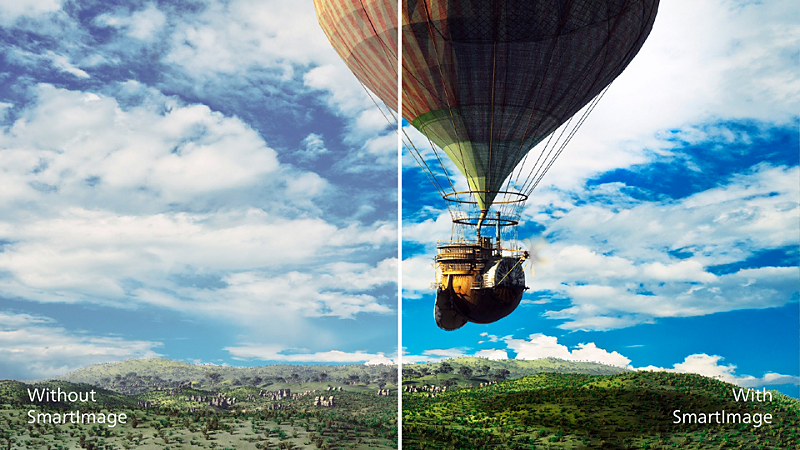
SmartImage 預設提供簡易優化圖像設定
SmartImage 為 Philips 獨創的尖端科技,能夠分析屏幕播放的內容並提供最佳的顯示效能。簡單易用的介面允許您選擇各種模式,如辦公、相片、影片、經濟等,以配合所使用的應用程式。SmartImage 能根據您的選擇,有效優化影像和影片的對比度、色彩飽和度及清晰度,以達到最佳的顯示效能。經濟模式可以為您節省大量電力。只要按一下按鈕即可馬上享受!
SmartControl 效能調頻易如反掌
進行顯示器效能微調與設定的電腦軟件。Philips 提供使用者兩種調整顯示設定的方法。使用者可使用顯示器上的按鈕經由屏幕操作系統 (OSD) 進行調整,也可以使用 Philips 的 SmartControl 軟件以類似方式輕鬆調整顯示器設定
SmartPower:最高可節省 50% 的電力
SmartPower 為一種人工智能技術,可以動態分析屏幕影像,從而節省電力。背光強度可由系統自動控制及預設,減少高達 50% 的能耗,進而節省能源費用。
技術規格
Curved Monitors
Philips monitors Curved displays take this experience one step further, gently wrapping around you and embracing your field of vision with a curve that mimics the natural shape of the eye.


Docking Solutions
Experience the convenience of a single cable connection that simplifies your setup and boosts productivity with Philips USB-C docking monitors. With just one cable, you can extend your laptop's battery life without needing extra power adapters.

Video Conferencing
The Philips Video Conferencing Monitor offers a seamless, all-in-one solution for video calls, with an integrated webcam, microphone, and speakers for full audio-visual support. Designed for convenience and efficiency, it features Philips’ advanced technology, USB-C docking, and device consolidation to save space, energy, and costs—perfect for compact workspaces.
Compare
新頁面
新頁面
24B1U5301H/75- 5000 系列
- 24(23.8" / 60.5 cm 對角線)
- 1920 x 1080(Full HD)
新頁面
新頁面
新頁面
新頁面
新頁面
新頁面
新頁面
439P1/00- P 系列
- 43(42.51" / 108 cm 對角線)
- 3840 x 2160(4K 超高清)
- 242B1H/69
- B 系列
- 24(可視尺寸 23.8 吋 / 60.5 厘米)
- 1920 x 1080(全高清)
- 27B1U7903/69
- Brilliance 7000
- 27 吋(68.6 厘米)
- 3840 x 2160(4K 超高清)
- 32B1U3900/69
- 3000 系列
- 32(可視尺寸 31.5 吋 / 80 厘米)
- 3840 x 2160(4K 超高清)
- 40B1U5600/69
- 5000 系列
- 40(39.53" / 100.4 cm 對角線)
- 3440 x 1440(WQHD)
- 45B1U6900CH/69
- 6000 系列
- 45(44.5" / 113 cm 對角線)
- 5120 x 1440(雙 QHD)
- 499P9H1/69
- P 系列
- 49(可視尺寸 48.8 吋 / 124 厘米)
- 5120 x 1440 (Dual QHD)
- 49B2U5900CH/69
- 5000 系列
- 49(48.8" / 124 cm 對角線)
- 5120 x 1440(雙 QHD)


客戶服務及支援
獲取產品幫助、尋找說明書、了解貼士和秘訣,及解決任何問題
"IPS" word mark / trademark and related patents on technologies belong to their respective owners.
EPEAT 評級認證僅於 Philips 註冊產品的地方有效。請瀏覽 https://www.epeat.net/,查看您國家/地區的註冊狀態。
響應時間值等於 SmartResponse