When I started the initial TV installation, the TV prompted me to press the 'OK' key but there is no response from the TV.
Ensure that the battery of the remote control is inserted according to the illustration inside the battery compartment and then press the ‘OK’ key again.
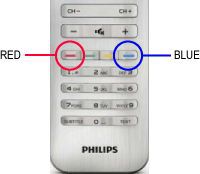
If the TV is still not responding, hold the Remote control close to the Philips logo (about 10 cm) and press the Red and Blue key at the same time. Once the pairing is successful, you can start with the initial TV installation.
When the pairing is still not successful:
1) Please contact the Philips Consumer Care center for further assistance or to find more information related to this issue. You can find the contact details on the Consumer Support page.
2) Make sure you have the model number and the serial number at hand when you call us. You find these numbers on the sticker at the side/back/bottom of your TV.