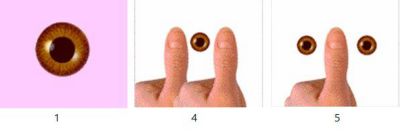
In order to see 3D your brain has to use the visual information from both eyes. If the two eye views are too different and cannot be matched up, the brain will be forced to make a choice. It will reject all or part of the information from one eye. The brain can suppress or turn off visual information it cannot use. The Framing Game can tell you whether both your eyes are TURNED ON at the same time. The illustration to the below demonstrates what should happen.
- Centre your nose over the brown eye below.
- Focus your eyes on the single brown eye.
- Put your free thumb in front of your nose.
- Continue to focus on the eye. If both eyes are on, you will see two thumbs framing one eye.
- Now, switch your focus to your thumb. You should see two eyes framing one thumb.
SUCCESSFUL?
Both your eyes are ON and you are an excellent candidate for 3D viewing fun. Continue with this guide and enjoy!