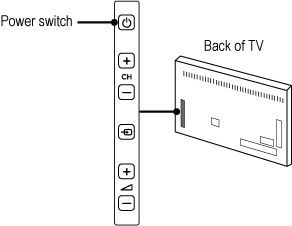
Make sure that the power cable is properly secured into the power socket of the TV and switch on the TV with the power switch. Your TV power switch is located at the back right-hand side of the TV. There is no red indicator when the TV is switched off.
Although your TV consumes very little power when you switched off with the power switch , we recommend that you switch off the TV completely by disconnecting the power plug if you are not going to use it for an extended period of time. When disconnecting the power cable, always pull the power plug, never the cable. Ensure that you have full access to the power plug, power cord and outlet socket at all times.
If your TV still does not switch on:
- Please contact the Philips Consumer Care center for further assistance or to find more information related to this issue. You can find the contact details on the Consumer Support page
- Make sure you have the model number and the serial number at hand when you call us. You find these numbers on the sticker at the side/back/bottom of your TV